File Size Conversion Guide: B, KB, MB, GB, TB Explained
Ever wondered how many megabytes are in a gigabyte, or if a kilobyte is bigger than a megabyte? You’re not alone! Understanding file sizes, from kilobytes (KB) to megabytes (MB), gigabytes (GB), and terabytes (TB) can be confusing. This article explains these units in an easy way so everyone will understand. It will show you how to convert from KB to MB, MB to GB, and GB to TB. You will also find a file size converter tool for quick calculations. By the end, you’ll know exactly what those pesky file size numbers mean and how to manage them with confidence.
Data Size
Converter
Convert between KB, MB, GB and TB instantly. Click any result to copy. Mb to kb converter or Mb to gb converter.
Quick Reference: File Size Conversions
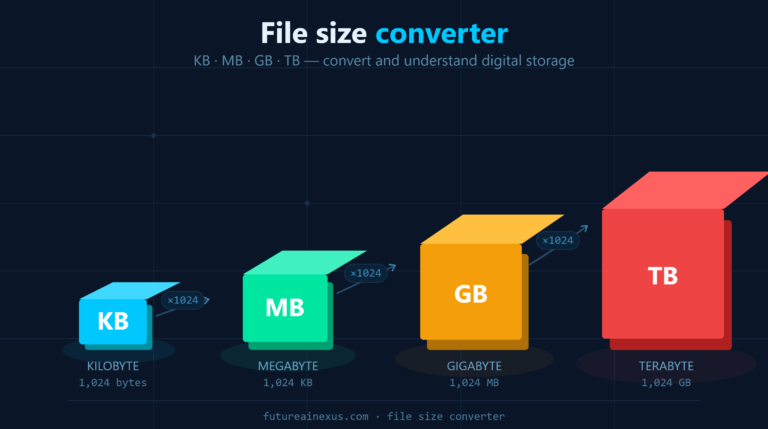
1 KB = 1,024 bytes
1 MB = 1,024 KB (about 1,048,576 bytes)
1 GB = 1,024 MB (about 1,073,741,824 bytes)
1 TB = 1,024 GB (about 1,099,511,627,776 bytes)
Understanding File Sizes – B, KB, MB, GB, TB
Byte: Let’s start from a single byte (B) is a tiny unit of data – just enough to store one character (like a letter or number). Bytes are the building blocks of file sizes. Now, because bytes are so small, we group them into larger units:
Kilobyte (KB)
- Approximate Size: Roughly one thousand bytes.
- Technical Precision: $1 \text{ KB} = 1,024 \text{ bytes}$.
- Real-World Example: Very small files, such as a short email (plain text) or a tiny icon image.
Megabyte (MB)
- Approximate Size: Roughly one million bytes.
- Technical Precision: $1 \text{ MB} = 1,024 \text{ KB}$.
- Real-World Example: Medium-sized files like a high-resolution photo or a standard-quality, 3-minute MP3 song (typically $3-5 \text{ MB}$).
Gigabyte (GB)
- Approximate Size: Roughly one billion bytes.
- Technical Precision: $1 \text{ GB} = 1,024 \text{ MB}$.
- Real-World Example: Large digital items and storage capacities. This unit is common to smartphone storage, USB flash drives, and computer RAM. A standard DVD movie is typically about $4-5 \text{ GB}$.
Terabyte (TB)
- Approximate Size: Roughly one trillion bytes.
- Technical Precision: $1 \text{ TB} = 1,024 \text{ GB}$.
- Real-World Example: Enormous storage capacity, commonly used for external and modern internal computer hard drives. One TB can hold approximately 500 hours of high-definition video or about 250,000 MP3 songs.
In summary, each step upward (KB → MB → GB → TB) multiplies by 1,024 in the binary system. This is why a megabyte is much bigger than a kilobyte, a gigabyte is much bigger than a megabyte, and so on. It’s like moving from one Lego brick to a block of 1,024 bricks. Then, you go to a block of 1,024 of those blocks. The size grows very fast!
Why 1 KB is 1,024 Bytes (Binary vs Decimal)
You might be thinking, “Why 1,024? Why not a nice round 1,000?” Computers use binary (base-2) math, so it’s convenient for them to count in powers of 2. 1 KB = 210 bytes = 1,024 bytes. Similarly, 1 MB = 220 bytes = 1,048,576 bytes. However, in everyday usage and marketing (like hard drive sizes), you’ll also see decimal definitions (1 MB = 1,000,000 bytes). This can cause slight confusion. For example, a “500 GB” hard drive (decimal) might show about 465 GB in your computer (binary) – because the computer is dividing by 1,024 instead of 1,000. Don’t worry too much about this discrepancy; just remember that in most technical contexts, we use the binary interpretation. In this guide (and our converter tool), we assume 1 KB = 1,024 bytes for accuracy.
Converting KB, MB, GB, and TB
File size conversions are actually straightforward once you know the relationships. Here’s how to convert between the common units:
- KB to MB: To convert kilobytes to megabytes (kb to mb), divide by 1,024. For example, 5,120 KB divided by 1,024 equals 5 MB. So if you see a file that’s 50,000 KB, that’s approximately 48.8 MB (50,000 / 1,024).
- MB to GB: To convert megabytes to gigabytes, divide by 1,024 again. For instance, 2,048 MB is 2 GB (because 2,048 / 1,024 = 2). If you have 10,000 MB of data, that’s about 9.77 GB.
- GB to TB: Gigabytes to terabytes; divide by 1,024 again. For example, 1,024 GB = 1 TB. If your computer has 250 GB of storage, that’s 0.244 TB (250 / 1024).
- Converting downward (larger to smaller units): You multiply instead. e.g., to find out how many KB are in 5 MB, multiply 5 by 1,024 (since 1 MB = 1,024 KB). That gives 5,120 KB in 5 MB. Likewise, 3 GB = 3 × 1,024 MB = 3,072 MB.
Many people ask questions like, “How many KB in a MB?” or “How many MB in a GB?” Now you know the answer: 1 MB is 1,024 KB, and 1 GB is 1,024 MB in binary terms. Essentially, each unit is 1,024 times the previous one. If you like the decimal view, it’s 1,000 (1,000 KB in a “decimal” MB). However, we use 1,024 here because that’s what computers really use.
Doing these calculations by hand can be difficult (who wants to divide or multiply by 1,024 all day?). To make life easier, we’ve included a handy tool.
Real World Examples of File Sizes
It might help to put these units in perspective:
- A simple text email or text file: usually a few KB. For example, a one-page text-only document might be 10 KB or less.
- A high-resolution photo: a few MB. Most smartphone photos today are between 2 MB and 5 MB, depending on resolution and compression.
- An MP3 song (3-4 minutes): around 4–5 MB (compressed). So, a music album (say 10 songs) might be ~35 MB in total.
- A standard HD movie (1.5 hours): maybe 700 MB to 1,400 MB (around 0.7–1.4 GB) if highly compressed. A high-definition movie on a DVD is about 4.7 GB. Blu-ray movies (full HD) can be 20+ GB each.
- Your computer’s RAM: Modern PCs might have 16 GB, 32 GB, or more RAM. That’s the memory for running programs, not storage, but it’s measured in gigabytes too (because it’s essentially how much data it can hold at once).
- Hard drive / SSD storage: Often measured in GB or TB. For example, a common solid-state drive might be 256 GB or 512 GB, whereas external backup drives often come in 1 TB or 2 TB sizes (or more!). If you have a 1 TB drive, remember that’s about 1,000 GB of space.
As you can see, KB, MB, GB, and TB are everywhere in our digital life. Knowing the differences can help you make informed decisions, like understanding why a file won’t attach to an email (it might be 25 MB, too big for some email services), or why you might need a larger hard drive when your 500 GB drive is nearly full (time for an upgrade!).
Manage Your Files and Storage Like a Pro
Understanding file sizes is not just a Specialized fact – it’s practical knowledge. When you know that, say, 1 GB = 1024 MB, you can estimate how many videos you can store on your phone, or how long a download might take on your internet connection. If you frequently run low on gigabytes, you need a hard drive upgrade or an external drive for extra storage. On the other hand, if you’re deleting files and later regret it, our data recovery experts at Future Tech Perth will retrieve those lost files for you!
Also, keep in mind that a nearly full disk (whether it’s a 256 GB laptop drive or a 2 TB external drive) can slow down your computer. Large amounts of data and limited free space make it harder for your system to operate efficiently. Regular maintenance, such as cleaning temporary files, can keep things running smoothly. Future Tech Perth offers comprehensive PC overall services to speed up slow computers, so you can make the most of every megabyte of memory and storage you have.
If you lost your Data.
Need help with your computer’s storage or performance? The Future AI Nexus is here for you. We can assist with everything from recovering lost files to upgrading your hard drive or SSD for more space. Our friendly technicians can even perform a comprehensive PC tune-up to get your system running smoothly. Don’t let bytes and gigs stress you out – reach out to us for expert help!