
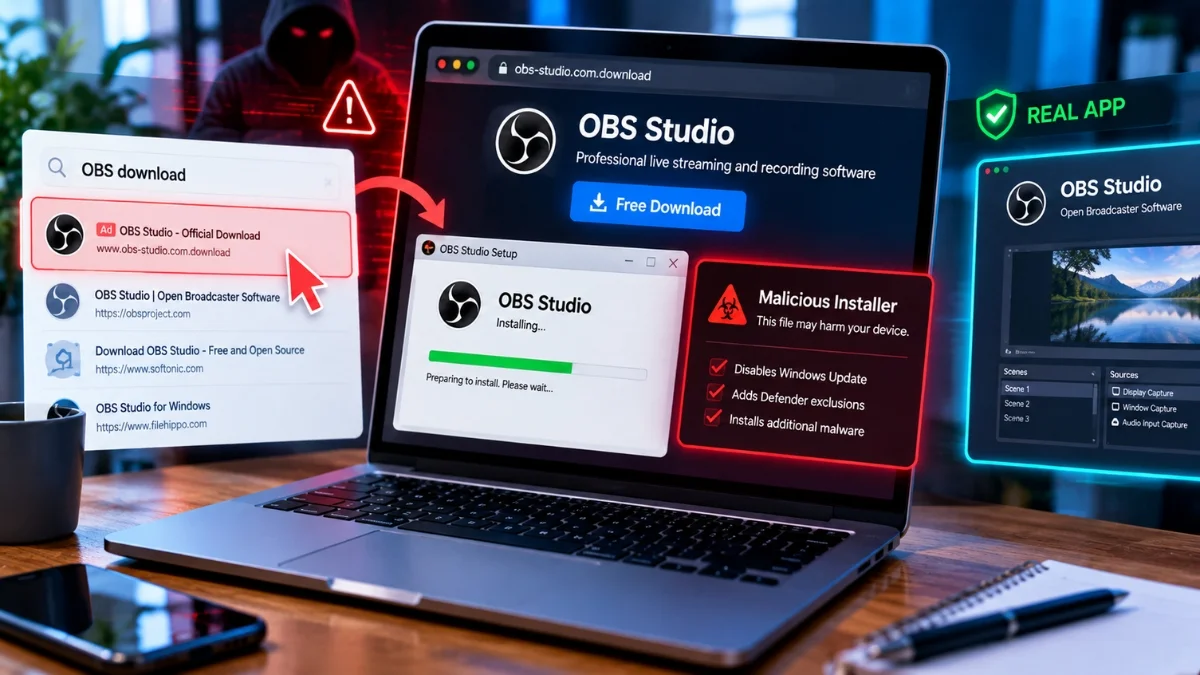
Why Downloading Apps From Random Websites Is Riskier Than You Think
Because the site is not random. Attackers buy search rankings, so the poisoned result is often the top one for the software you wanted. Modern campaigns also install the genuine application alongside the malware, which removes the last signal most people rely on. And the payloads no longer just steal data. The Silver Fox campaign disables Windows Update services and adds Defender exclusions as SYSTEM, so the machine loses the ability to fix itself.
Key takeaways
- The Silver Fox campaign, which Microsoft assesses with moderate confidence as a Chinese threat cluster, impersonates Microsoft Edge, Kaspersky, OBS, Draw.io, Calibre, SteelSeries, Razer Zone and others.
- Its installers stop and disable wuauserv, UsoSvc, uhssvc and WaaSMedicSvc, rename update DLLs, delete the SoftwareDistribution cache, and create SYSTEM-level scheduled tasks that add Defender exclusions via PowerShell.
- A separate campaign typosquatted Gemini CLI and Claude Code at domains like geminicli.co.com and claudecode.co.com, and installed the legitimate tool alongside a fileless infostealer as cover.
- That infostealer targeted Slack, Teams, Discord, Zoom, Mattermost, Notion, Telegram and Zoho Mail, plus browser credentials and DPAPI-protected keys.
- Over 30 further fake domains targeted Node.js, Chocolatey and KeePassXC. A separate campaign impersonated more than 25 popular apps to deliver AsyncRAT from October 2025.
- The most dangerous variant is not a download at all. It is a webpage instructing you to paste a PowerShell command.
The word “random” is doing the damage
The standard advice tells people not to download software from random websites, and it fails because nobody thinks the site they are on is random.
Here is how it actually goes. You need OBS, or Draw.io, or a PDF tool. You search for it. You click one of the first results. The page looks right, the branding matches, the download button works, and the software installs.
You did not go anywhere random. You went to the top of the search results, which is where everybody goes.
That is precisely the position attackers now buy and optimize for. SEO poisoning means investing real effort in ranking a malicious page for a legitimate software query, through purchased ads, backlink networks, and pages built specifically to rank. Campaigns have impersonated more than 25 popular applications to deliver AsyncRAT, running since October 2025, and separate operations have targeted WhatsApp and Chrome installers in search results.
Once you accept that the poisoned result can be the first result, every piece of advice built around “recognising a suspicious site” stops working. Recognition is not the defence. Source verification is, and they are different things.
What a fake installer does to your machine now
The Silver Fox campaign, also tracked as Yinhu, is worth going through in detail because it shows how far this has moved from adware.
It impersonates a long list of ordinary software: Microsoft Edge, Baidu Pan, Calibre, Draw.io, Sogou, Kaspersky Lab, MindMeister, OBS, Razer Zone, Sejda, SteelSeries, Youdao Translate and DiskGenius. Note how mundane that list is. This is not targeting people hunting for cracked software. It is targeting people who need a diagramming tool.
What the installer does after it runs:
Kills Windows Update. It stops and disables wuauserv, UsoSvc, uhssvc and WaaSMedicSvc. Those four services are Windows Update and the components that repair Windows Update when it breaks. It then renames update DLLs and deletes the SoftwareDistribution cache.
Blinds Defender. It creates scheduled tasks that run as SYSTEM and use PowerShell to configure Microsoft Defender exclusions.
Establishes persistence and calls home. Communication with attacker infrastructure over non-standard ports including 5090, 7031, 7032, 7088 to 7090, 8050, 28290, 28300, and observed command-and-control domains including iualef[.]net and oijfwe[.]net.
Read the first two together, because that combination is the point. The malware infects the machine and then removes its ability to receive the patch that would remove it, and tells the built-in antivirus to ignore the directories it lives in.
Microsoft assesses with moderate confidence that this aligns with Silver Fox, a cluster known for distributing Gh0st RAT and ValleyRAT. Affected sectors include healthcare, manufacturing, gaming, technology, logistics, government and education.
The wrapper filenames follow patterns like a_instapp83353001.exe or ainst8663586104.exe, and the chain leverages msiexec.exe to launch randomised executables, which helps it blend into normal installer behaviour.
The trick that removes your last warning sign
Most people’s actual security model is a feeling: if something goes wrong, I will notice. The software will not install, or it will look off, or something will crash.
A campaign running from March 2026 removed that.
Attackers typosquatted developer tools at domains such as geminicli.co.com and claudecode.co.com, mimicking official documentation pages and ranking well in search. Users following the instructions ended up running a script that downloaded start.ps1.
The script installed the legitimate tool at the same time.
So the user got exactly what they came for. Gemini CLI works. Claude Code works. The documentation matched, the installation succeeded, the tool functions. There is no crash, no missing feature, no visible failure of any kind.
Meanwhile a fileless infostealer operating through PowerShell memory injection collected browser credentials, cookies and autofill data from Firefox, Chrome, Edge and Brave, DPAPI-protected keys, cryptocurrency wallet data and cloud storage files, and targeted Slack, Teams, Discord, Zoom, Mattermost, Notion, Telegram and Zoho Mail. It also included remote code execution capability.
The campaign was discovered on 21 April 2026 by the researcher known as @g0njxa and reported on 21 May 2026 by EclecticIQ, having started in early March for the Gemini lure and 30 March for the Claude one, primarily targeting developers in the US and UK.
Note the gap between start and disclosure. Roughly two months of operation before public reporting. During that window, the only way to know you were compromised was to be watching your own network traffic.
Also read: Don’t Give Sites and Stores Your Credit Card Number… Do This Instead
The attack that is not a download
The most effective current variant does not involve downloading a file at all, which defeats every defence built around scanning downloads.
The page tells you to copy a command and paste it into PowerShell or a terminal. The framing varies: an installation instruction, a fix for an error, a verification step to prove you are not a bot.
This works for three reasons. It bypasses download scanning entirely, because no file is downloaded through the browser. It bypasses SmartScreen and Gatekeeper reputation checks, because you are not launching an executable. And it converts the user into the delivery mechanism, since you typed the command yourself, at an elevated prompt, deliberately.
The rule that follows is absolute and easy: never paste a command from a webpage into a terminal unless you can read it and understand every part of it. Not “it looks fine.” Not “the site seemed official.” If the command includes a URL and a pipe into an execution context, it is running code you have not seen from a server you do not control.
Legitimate software does sometimes distribute this way, which is what makes the pattern effective. That is an argument for the packaged install methods below, not for trusting the pattern.
Why developers get targeted specifically
Beyond Gemini CLI and Claude Code, over 30 further fake domains targeted Node.js, Chocolatey and KeePassXC.
The reason is straightforward. A developer’s machine holds cloud provider credentials, repository access tokens, SSH keys, package registry publishing rights and production database connection strings. Compromising one developer often means compromising the systems that developer can reach, which can include the software their employer ships to customers.
Which is why the stolen credential list in that campaign focused on corporate collaboration platforms rather than consumer accounts. Slack, Teams, Mattermost and Notion tokens are lateral movement into an organisation.
Developers also tend to install more unfamiliar software than anyone else, from more varied sources, more often, and frequently with elevated privileges. It is the highest-value target with the largest attack surface.
The defense hierarchy, ranked
In order of how much protection each actually provides.
1. Package managers pointed at official repositories. On Windows, winget. On macOS, Homebrew or the App Store. On Linux, your distribution’s package manager. These fetch from known sources with signature verification, and there is no webpage in the chain to poison. This single change eliminates most of the risk described above.
2. Type the vendor’s domain by hand. Not searching, not clicking a result, not following a link from documentation you found in search. Type the domain you know, or use a bookmark you made previously. If you do not know the domain, find it from an authoritative reference such as the project’s own repository, and bookmark it.
3. Verify signatures and checksums. Most reputable projects publish a hash for each release. Comparing it takes thirty seconds. On Windows, check the file’s digital signature properties and confirm the publisher name matches the actual vendor rather than something similar.
4. Never paste a command you cannot read. Covered above, and it is the rule with the highest ratio of protection to effort.
5. Do not run installers as administrator unless required. Silver Fox’s most damaging actions, disabling update services and adding Defender exclusions as SYSTEM, need elevation. Denying it does not stop everything, and it limits a great deal.
6. Watch for search ads. Sponsored results at the top of a search for common software are a known malvertising vector. Scroll past them.
If you think you already ran one
Symptoms worth taking seriously, particularly on Windows: Windows Update failing or showing no available updates for an unusually long time; Defender reporting that settings are managed by your organisation on a personal machine; unfamiliar scheduled tasks; unexpected Defender exclusions.
Practical steps, in order:
Disconnect from the network, to stop credential exfiltration and command-and-control traffic.
From a different, trusted device, change passwords for email, banking, cloud accounts and any developer platform you use. Session cookies were likely stolen, so also revoke active sessions everywhere, because a password change alone does not invalidate a stolen cookie.
Rotate SSH keys, API tokens and cloud credentials if this is a work machine.
Check Defender exclusions and scheduled tasks for entries you did not create.
Assume a full rebuild is the only reliable remediation. Malware that disables Windows Update and configures Defender exclusions has specifically defeated the tools you would use to clean it in place.
If it is a work device, tell your security team before doing any of this. They will want the forensic evidence intact.
The short version
The advice that works is not “avoid suspicious websites,” because the poisoned site is often the top search result and looks exactly right. It is “get software from a package manager or a domain you typed yourself,” and “never paste a command you cannot read.”
Two habits. They cover almost everything described here.